In the Cockpit
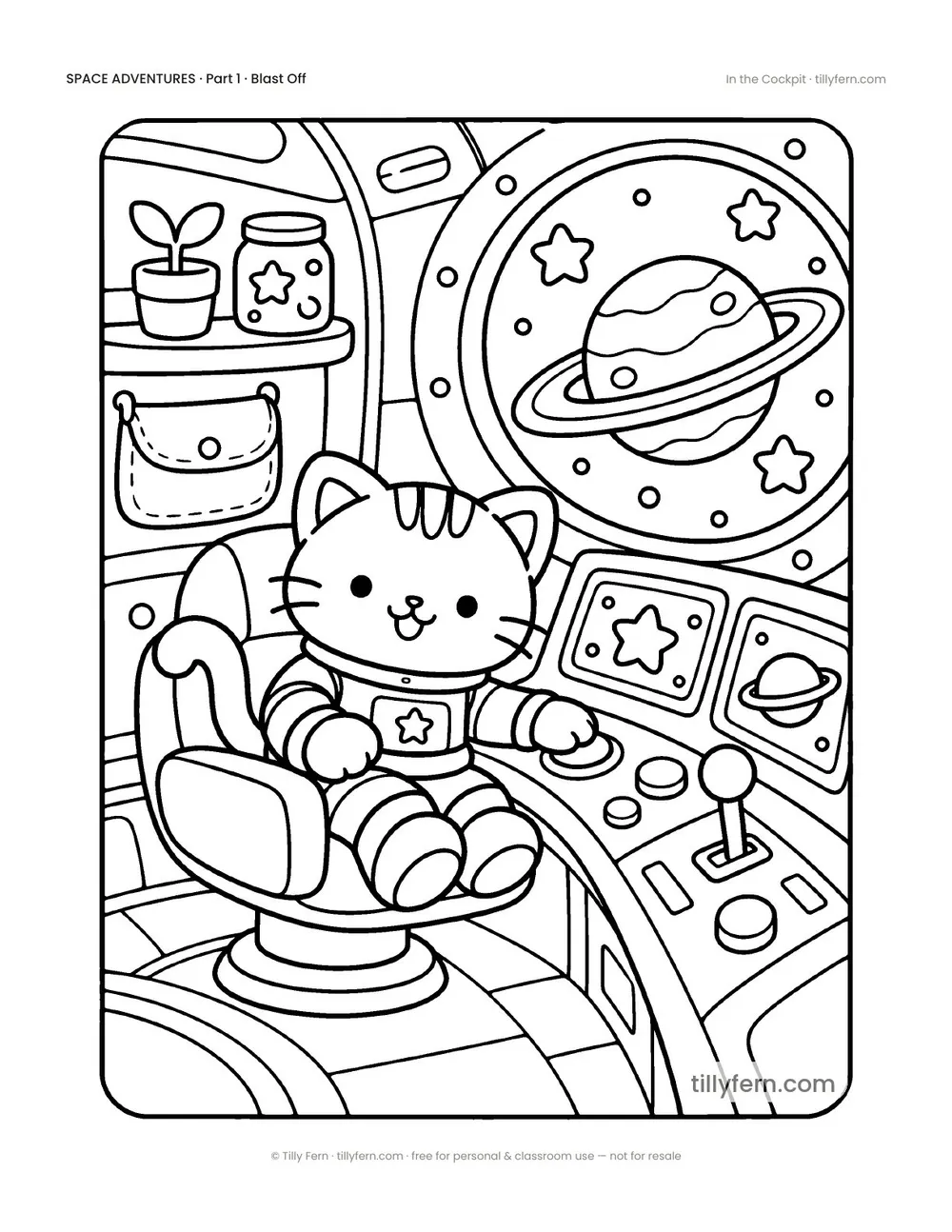
The kitty sits in the pilot seat pressing buttons on a control panel with screens, a joystick and a big window showing a ringed planet.
Download
How to print: open the PDF and print at 100% ("actual size") on Letter or A4 paper. The page has a white margin, so nothing gets cut off.
More from Part 1
View all
About this coloring page
Inside the rocket the kitty takes the pilot seat. A curved control panel is full of buttons, a joystick, round dials and two screens with star and planet icons. Through a large porthole you can see a ringed planet and stars, and the cabin has a shelf with a potted plant, a jar of stars and a pouch on the wall. This page has many small rectangles and circles, which older kids love to fill with bright colors.
Printing and coloring tips
Print at 100% on Letter or A4. Plain 80–100 gsm copy paper is fine for crayons and colored pencils; for markers, use thicker paper or put a scrap sheet underneath so the ink doesn't bleed through. Detailed scenes like this one are easier with fine-tip markers or sharpened pencils.
Ideas for this page
- Make every button a different color — real control panels are colorful.
- Draw what the kitty sees on the screens: a planet, a map or a smiley face.
Questions
Is this page detailed?
Medium. The kitty and the seat are big shapes; the buttons and dials add detail for older kids.